
A single `.html` file is quietly having a second life. Between Claude Code, Codex, Cursor, and ChatGPT, I end up with standalone HTML files almost every day—an interactive latency report, a quick UI mockup, a SQL analysis summary, an email layout, or a single-file client prototype.
Generating that file takes ten seconds. Sending it to a teammate or opening it on a phone somehow still feels like 2006.
If you drop `report.html` into Slack or email, mobile apps show raw source code or refuse to open it. If your colleague downloads it and double-clicks it, the browser opens it under `file://`, gives it a `null` origin, and blocks ES modules or `fetch()` calls. If you just want a clean URL, spinning up a Git repository and waiting on a CI build for a throwaway 40 KB file is absurd.
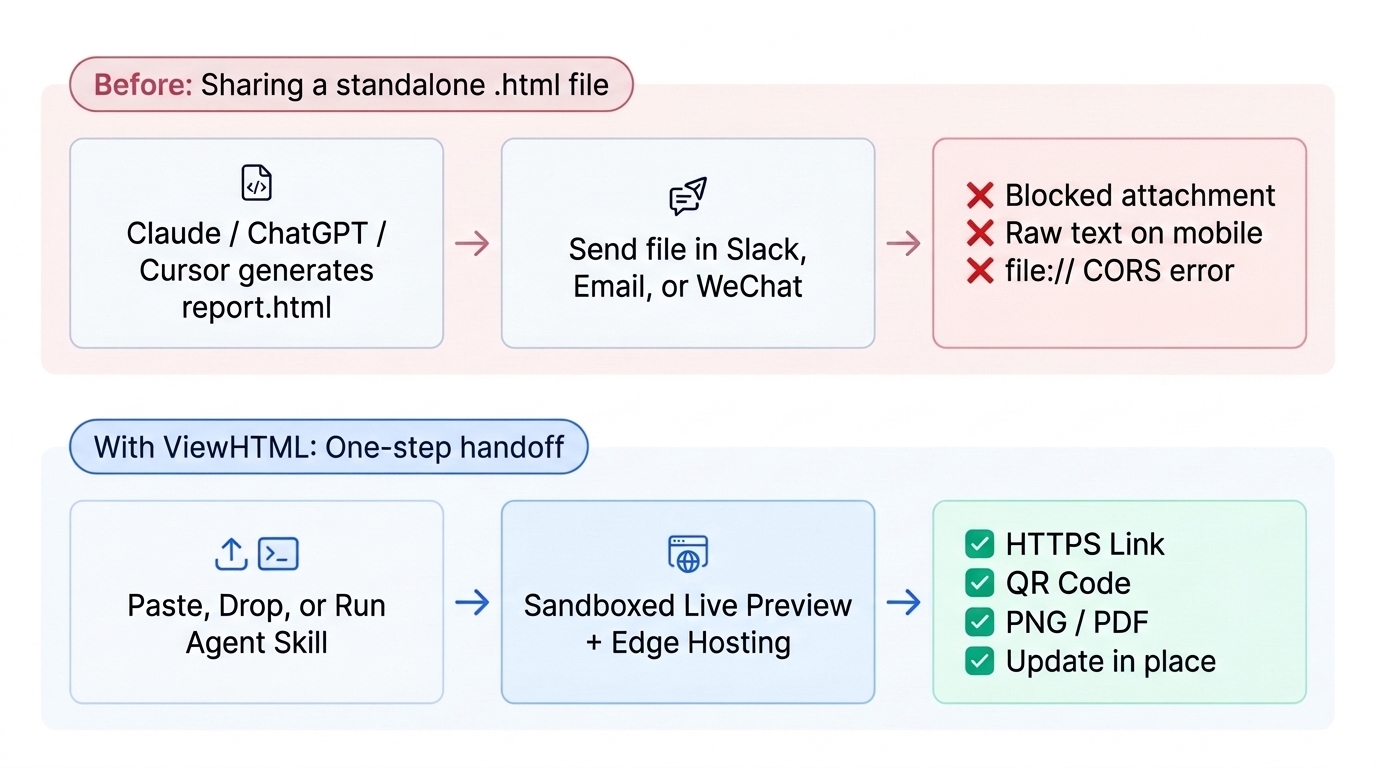
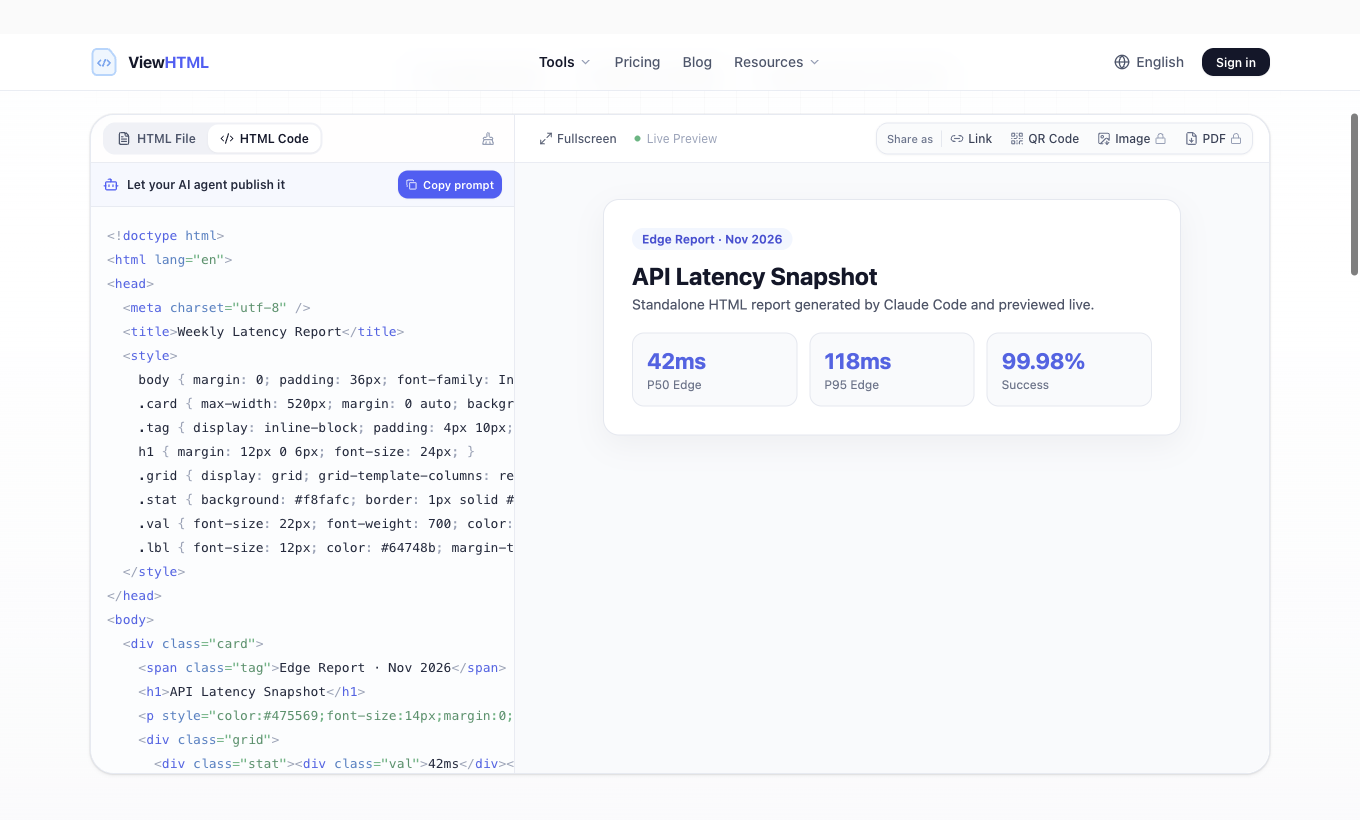
That friction is why I built ViewHTML. I did not want another heavy code playground or a full PaaS. I wanted one place where you can paste or drop a complete HTML document, see it rendered immediately, and hand it off as a link, QR code, PNG, or PDF—or let an AI agent publish it straight from the terminal.
Why existing tools didn't quite fit
Before writing a line of code, I tried living on existing tools for a few weeks. All of them are good products, just built for slightly different jobs:
- CodePen and JSFiddle split code into HTML, CSS, and JS panes. Great when authoring a component from scratch, annoying when pasting a complete `<!doctype html>` file that already has `<head>`, CDN scripts, and inline styles—plus free Pens are public-only.
- Netlify Drop lets you drag a folder, which is handy for multi-file bundles, but anonymous drops now expire in 1 hour unless claimed to a full hosting account.
- GitHub Gist + htmlpreview works if you already live on GitHub, but relies on a third-party proxy URL and routinely breaks strict CSP headers or modern script setups.
- Older free HTML viewer sites often render pasted code without clear origin isolation, cover half the viewport in ads, or stop at preview with no way to share or export.
Five real engineering problems I hit while building it
On paper, "paste HTML and host it" sounds like a weekend project. Once real users and AI agents start pasting arbitrary HTML, CSS, and JavaScript, five very concrete problems show up immediately.
1. Running untrusted HTML without exposing session cookies
The moment you host user-supplied HTML with JavaScript enabled, XSS is not a bug—it is the default behavior unless you isolate origins properly. Two rules turned out to be non-negotiable:
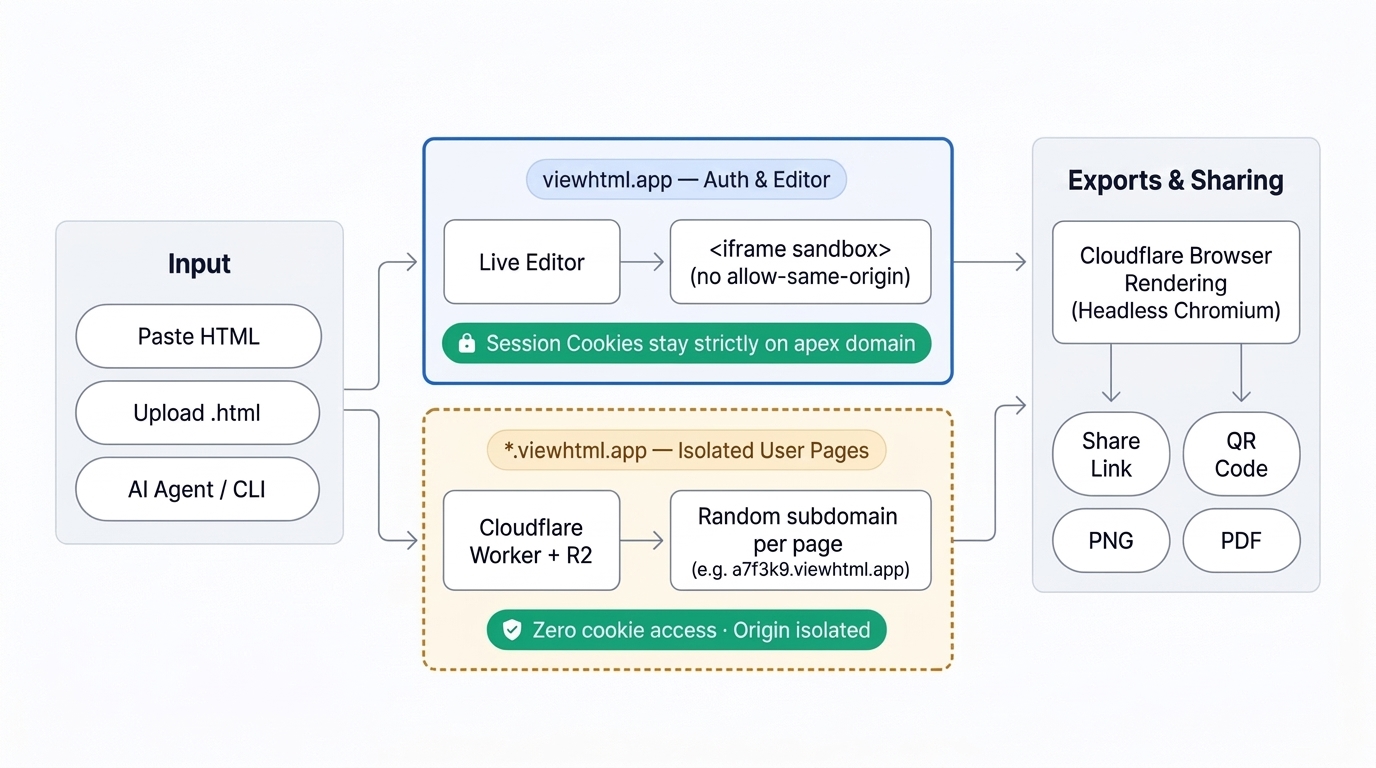
- In the live editor on `viewhtml.app`, the preview renders inside an `<iframe sandbox="allow-forms allow-modals allow-popups allow-scripts">`—deliberately WITHOUT `allow-same-origin`. Even if someone pastes malicious JavaScript, it runs in an opaque origin and cannot read cookies, localStorage, or the parent DOM.
- Published pages are served from random subdomains (`<random>.viewhtml.app`) via a separate edge Worker reading directly from Cloudflare R2, while auth cookies stay strictly host-only on `viewhtml.app` (never `domain=.viewhtml.app`). User scripts on a published page have zero access to the main app's session.
2. Keeping PNG and PDF exports faithful to modern CSS
Early on I looked at lightweight server-side HTML-to-PDF tools, but modern AI-generated HTML is packed with Tailwind CSS, Flexbox, CSS Grid, CSS custom properties, web fonts, and SVG charts. Legacy tools like `wkhtmltopdf` (now archived and stuck on a decade-old WebKit engine) mangled those layouts. Instead, exports run asynchronously through a Cloudflare Queue into Headless Chromium (Cloudflare Browser Rendering) with `printBackground: true` and `preferCSSPageSize: true`. I also wrote a separate HTML-to-PDF print CSS guide covering the five layout bugs that still bite people even in real Chromium.
3. Zero-friction anonymous links without becoming a spam magnet
If you force signup before someone can generate their first share link, most developers will just close the tab. On the other hand, completely unrestricted anonymous hosting gets abused within days. The balance I landed on: anonymous publishes are deduplicated by SHA-256 content hash, rate-limited per hashed IP, and automatically expire after 3 days (returning `410 Gone`, then purged 24 hours later). If you sign in later from the same browser, ViewHTML verifies your share ID and hashed IP and claims those temporary pages straight into your account as permanent links.
4. Updating a shared page without sending a new URL
Nothing kills a design review faster than posting `v2`, `v3-final`, and `v3-final-really` links in the same thread. For signed-in users, every published page stores immutable snapshots (`versions/<pageId>/<n>`) in R2 and swaps the live subdomain copy in place. The URL never changes, and Pro accounts keep the last 10 versions with one-click rollback.
5. Letting AI coding agents publish directly (no copy-paste)
Once I looked at our own traffic logs, it became obvious that a large share of visitors were coming straight from ChatGPT or copying our agent prompt. Humans don't even want to open a browser tab just to copy-paste 80 KB of HTML that Claude Code already wrote to disk. So I exposed a clean dual-auth API (browser session or Bearer API key) and a lightweight ViewHTML Share Skill so coding agents can publish a file in one command and paste the live preview URL right back into your chat.
Exact scenarios where ViewHTML actually helps
If you are deciding whether ViewHTML fits a specific task—or building a workflow around AI-generated pages—here is the honest map of where it shines:
| Real-world scenario | Why it is painful by default | How ViewHTML handles it |
|---|---|---|
| Sharing a report, dashboard, or mockup generated by Claude Code, Cursor, or ChatGPT | Chat apps block `.html` attachments or show raw markup on mobile; `file://` breaks CDN/module scripts | Paste, upload, or let the agent publish directly via CLI/API → instant HTTPS link + QR code |
| Inspecting an unfamiliar `.html` email template or downloaded file | Double-clicking runs unknown JS directly in your browser tab with no code visibility | Drop into `/open-html-file-online` → inspect source side-by-side with an origin-isolated sandboxed iframe |
| Exporting an HTML invoice, resume, or card to a crisp PNG or A4 PDF | Local `Ctrl+P` drops background colors and varies by OS fonts; setting up Puppeteer takes time | Headless Chromium rendering with background graphics & `@page` support (2 free/day signed in, 100/day on Pro) |
| Iterating on a client prototype or internal status page | Quick-share tools mint a brand-new URL on every edit, breaking links already sent in Slack | Permanent URL with in-place version updates, optional password protection, and view stats |
| Collecting quick votes, RSVPs, or form responses inside a single HTML page | Requires wiring up a backend database, CORS, and API routes just for one lightweight page | Pro pages include built-in page KV, counters, and form record storage accessible directly from the HTML |
When you should skip ViewHTML
Just as importantly, ViewHTML is intentionally NOT a replacement for Git-based hosting. If you have a multi-route Next.js, Astro, or React repository that needs a bundler, preview branches, and CI checks, use Cloudflare Pages, Vercel, or Netlify. ViewHTML is built specifically for the gap underneath them: single-file HTML that needs to go from raw code to a safe, shareable link, image, or PDF in seconds.
If you run into any of those scenarios today, you can try the live HTML viewer without signing up, open a local file in the HTML file viewer, or see how it stacks up in our 2026 comparison of 6 online HTML viewers.
Try the HTML viewer
Paste your HTML into ViewHTML, preview the rendered page, then export the result as a URL, QR code, image, or PDF.
Open Free HTML Viewer